amazon echo dot
created  2025/05/04
modified 2025/05/13
category hardware
views    280
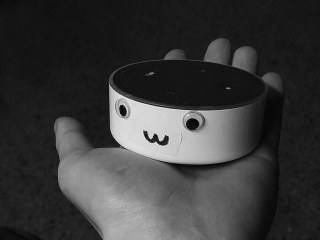
her name is anni, short for annihilation, she runs postmarketOS. currently the root for the echo is tethered, and the postmarket port for it lacks wifi and bluetooth. supposedly audio has recently been added but i don't know how to configure it
rainbow daemon
a featureful script to make controlling the echo's led ring easier
you can run rainbowd after the boot animation in `/etc/local.d/led.start` to play a custom animation or just turn the led off
#!/bin/sh
echo 0 > /sys/bus/i2c/devices/0-003f/boot_animation
rainbowd --clear
reclaiming storage space
by default, the userdata partition postmarketOS boots from only takes up the last 1.2gb of the flash memory. the android system_a/b and cache partitions are unused but take up 800mb each of your echo's meager 4gb of storage space
0. root your echo, installing postmarketOS is "optional" but doing this won't let you boot or install fireOS until you reset your partition table
1. run `mtk rl`, then plug your echo in to backup all your partitions, this should give you your userdata.img (and everything else you need for unbricking)
mkdir backup && cd backup
mtk rl . --preloader /path/to/mtkclient/Loader/Preloader/preloader_biscuit.bin
2. unplug your echo, and patch mtkclient to use the correct preloader (TODO: submit a pr to mtkclient, add a --preloader argument to fs)
preloader = "/path/to/mtkclient/Loader/Preloader/preloader_biscuit.bin"
^ line 318 (mtkclient/Library/DA/legacy/dalegacy_lib.py)
3. run `mtk fs`, then plug your echo in to mount the echo's flash
sudo mkdir /mnt/echo
sudo mtk fs --rw /mnt/echo
4. in a new terminal window, resize the partitions
you can resize the system_a/b and cache partitions to whatever you want, as long they exist the userdata partition will be recognized by the bootloader
sudo parted /mnt/echo/emmc_user.bin
(parted) rm 13
(parted) rm 14
(parted) rm 15
(parted) rm 16
(parted) mkpart system_a ext4 134217728B 134218239B
(parted) mkpart system_b ext4 134218240B 134218751B
(parted) mkpart cache ext4 134218752B 134219263B
(parted) mkpart userdata ext4 135266304B 3909074431B
type `ignore` if it tells you the partition is not properly aligned, that only matters for the userdata partition. you should end up with something like this:
(parted) print free
...
12   117440512B  134217727B   16777216B     recovery
13   134217728B  134218239B   512B          system_a
14   134218240B  134218751B   512B          system_b
15   134218752B  134219263B   512B          cache
16   135266304B  3909074431B  3773808128B   userdata
5. `quit` parted, then terminate `mtk fs`
6. reflash your userdata partition
mtk w userdata userdata.img --preloader /path/to/mtkclient/Loader/Preloader/preloader_biscuit.bin
7. reconnect your echo and run plstage to boot it, rootfs should now be 3.37gb!
annihilation:~# df -h /
Filesystem                Size  Used Avail Use% Mounted on
/dev/mapper/mmcblk0p16p2  3.3G  351M  2.8G  12% /
unbricking
i noticed this guide does *not* flash the preloader like it says it will, for some reason mtkclient does not detect the preloader parition, you will have to flash that with fastboot
the most important debricking step is to create backups! use `mtk rl` to dump all your partitions before touching them at all. if you do this you can lose your entire partition table without worry. if you do, you can recreate it by hand in `parted` and reflash all of your partitions and it will be like nothing ever happened
default partition table
Number  Start        End          Size         File system  Name    Flags
        17408B       1048575B     1031168B     Free Space
 1      1048576B     2097151B     1048576B                  kb
 2      2097152B     3145727B     1048576B                  dkb
        3145728B     16777215B    13631488B    Free Space
 3      16777216B    17825791B    1048576B                  lk_a
        17825792B    25165823B    7340032B     Free Space
 4      25165824B    30408703B    5242880B                  tee1
        30408704B    33554431B    3145728B     Free Space
 5      33554432B    34603007B    1048576B                  lk_b
        34603008B    41943039B    7340032B     Free Space
 6      41943040B    47185919B    5242880B                  tee2
        47185920B    50331647B    3145728B     Free Space
 7      50331648B    60817407B    10485760B                 expdb
 8      60817408B    61342207B    524800B                   misc
        61342208B    67108863B    5766656B     Free Space
 9      67108864B    83886079B    16777216B                 persist
10      83886080B    100663295B   16777216B                 boot_a
11      100663296B   117440511B   16777216B                 boot_b
12      117440512B   134217727B   16777216B                 recovery
        134217728B   150994943B   16777216B    Free Space
13      150994944B   956301311B   805306368B   ext4         system_a
14      956301312B   1761607679B  805306368B   ext4         system_b
15      1761607680B  2583691263B  822083584B   ext4         cache
16      2583691264B  3909074431B  1325383168B               userdata