note browsing with fzf
Since I now keep updated directories for tags and titles in my notes, I can just straight up call fzf instead of that complicated mechanism I was using for browsing notes by title and tag before.
The new method(s)
I have a script I run on saving notes (right after committing them) that updates the sym links. Described better in browsing by tags and titles.
These titles and tags are only not up to date when I sync my notes to a system. I could add a git hook, but I’m fine with just running my script once.
All of the following commands assume my notes live at ~/messy/. Which is the case for all of my notes.
Just find names
(cd ~/messy/ ; fzf --walker-root=meta)
That can be a bit to type, so an alias is in order:
alias nnames='(cd ~/messy/ ; fzf --walker-root=meta)'
Find a name and edit it
(cd ~/messy/ ; nvim "$(fzf --walker-root=meta)")
But what about other editors?
(cd ~/messy/ ; "${EDITOR}" "$(fzf --walker-root=meta)")
And again, that’s too much to type, so an alias:
alias ned='(cd ~/messy/ ; "${EDITOR}" "$(fzf --walker-root=meta)")'
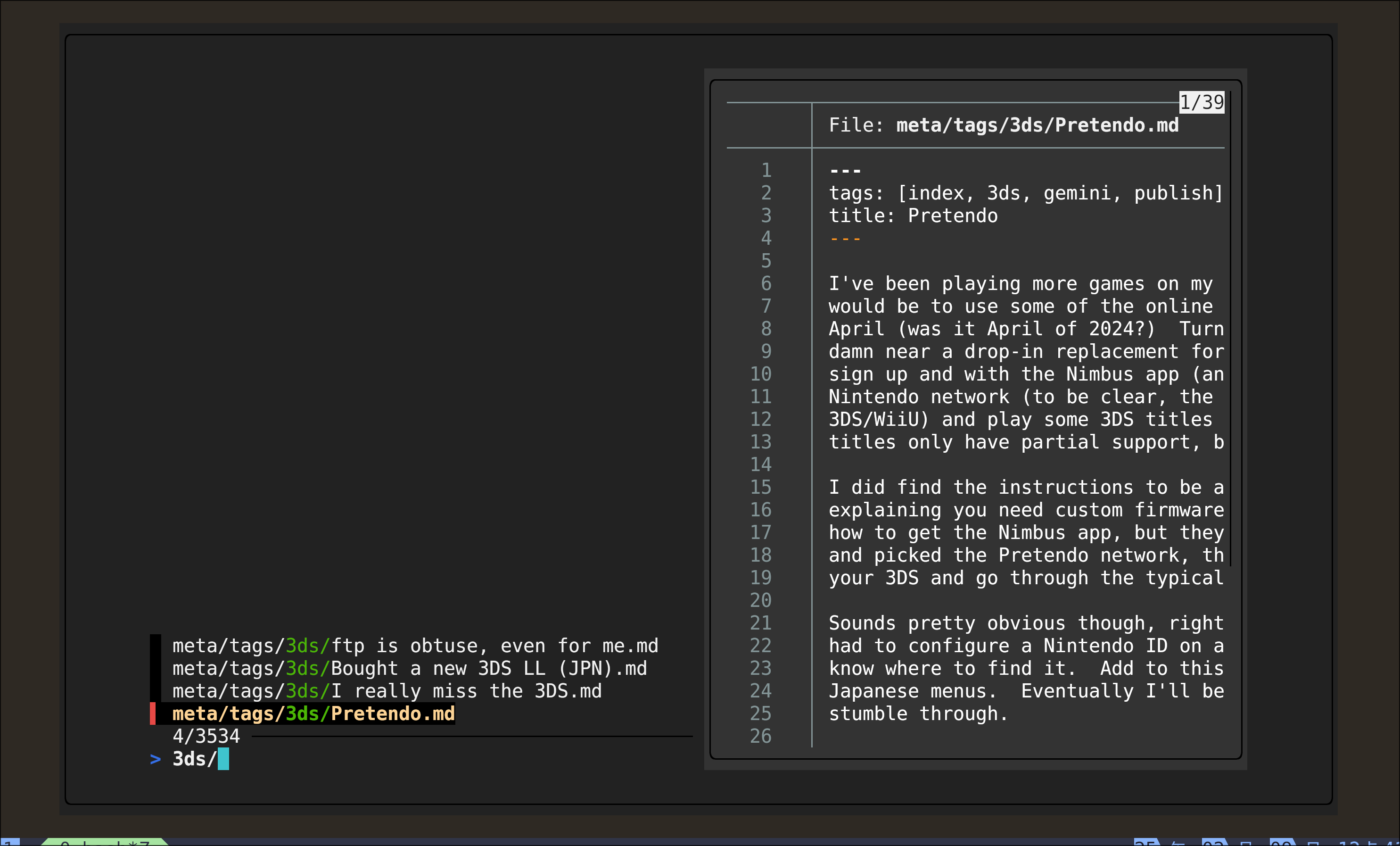
Find a name, show a preview, and launch an editor
This is basically telescope! And it’s almost verbatim from the manual page, but replace cat with bat:
(cd messy/ ; nvim "$(\
    fzf --margin 5% --padding 5% \
    --border --preview 'bat --color=always {}' \
    --color bg:#222222,preview-bg:#333333)")
More alias!
alias ped='(cd messy/ ; nvim "$(\
    fzf --margin 5% --padding 5% \
    --border --preview "bat --color=always {}" \
    --color bg:#222222,preview-bg:#333333)")'
And here’s an absolutely massive PNG that shows the output from that when I look for the 3ds tag in my notes by trailing the desired tag name with a slash.
The old method
This uses the script below, can be run on NixOS with chmod +x on it, or any system that has fzf and bemenu already installed via bashing it.
This prompts for input and lets the user type #tag and then search-term or just search-term and then launches an editor on the resulting file name.
#! /usr/bin/env nix-shell
#! nix-shell -i bash -p fzf bemenu

##
# This script assumes that it is located in a subdirectory under the project
# root and that all notes are located in a notes directory below the project.
# (ie notes in ../notes and this script is somewhere like scripts/)

set -e

WHERE=$(readlink -f ${BASH_SOURCE[0]})
NOTES=$(readlink -f ${WHERE%/*}/../notes)

MY_BOPS="--binding vim"
export BEMENU_OPTS="${BEMENU_OPTS:-${MY_BOPS}}"
export BEMENU_BACKEND="${BEMENU_BACKEND:-curses}"

##
# Display all note titles.
show_all_titles() (
   grep -hPo '(?<=^title: ).*' "${NOTES}"/*.md
)


##
# Display tags from all notes.
show_all_tags() (
   # does not support yaml arrays, just single line format
   grep -hPo '(?<=^tags: \[).*' "${NOTES}"/*.md \
     | sed 's/,/\n/g' \
     | sed 's/^\( *\)/#/g' \
     | sed 's/\]$//g' \
     | sort -u
)

##
# Reads from stdin and returns a list of files that
# contain the specified title or the specified tag
# if the string begins with a #.
normalize() (
    local TITLE TAG
    while read -r TITLE ; do
        COUNT=$((COUNT+1))
        if [[ "${TITLE}" =~ ^#(.*) ]] ; then
            TAG=${BASH_REMATCH[1]}
            grep -l "^tags: .*\<${TAG}\>" "${NOTES}"/*.md
        else
            grep -l "^title: ${TITLE}$" "${NOTES}"/*.md
        fi
    done
)

declare -a FILES
FILES=("" "")
while [ "${#FILES[@]}" -gt 1 ] ; do
    if [ -z "${FILES[0]}" ] ; then
        mapfile -t FILES < <(
            (
            show_all_titles
            show_all_tags
            ) | bemenu | normalize
        )
    else
        mapfile -t FILES < <(
            (
            for FILE in "${FILES[@]}" ; do
                grep -hPo '(?<=^title: ).*' "${FILE}"
            done
            )| bemenu | normalize
        )
    fi
done

if [ -n "${FILES[0]}" ] ; then
    "${EDITOR}" "${FILES[0]}"
fi
Tags: index
Tags
Navigation
Backlinks
created: 2025-02-09
(re)generated: 2025-11-27