Using aliases for complex and daily terminal commands
📆 2025-06-20 10:25
Using the terminal is made easier with aliases.
I know most of you know how to use aliases but they are awesome and deserve a post on my blog.
An alias is a short, easy to remember word or phrase, which substitutes a long and/or a complex Unix command.
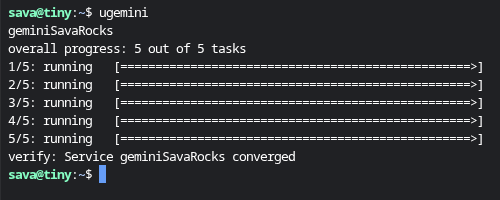
To add or edit aliases you have to modify your .bashrc file:
sudo vi .bash.rc
I use aliases especially for long commands. An example could be a docker service update command. Below you can find the aliases I use to update my smolnet docker services:
alias ugopher='docker service update --force --image git.sava.rocks/sava/gopher:latest gopherSavaRocks'
alias ugemini='docker service update --force --image git.sava.rocks/sava/gemini:latest geminiSavaRocks'
alias ufinger='docker service update --force --image git.sava.rocks/sava/finger:latest fingerSavaRocks'
alias uhttp='docker service update --force --image git.sava.rocks/sava/http:latest httpSavaRocks'
alias uhttps='docker service update --force --image git.sava.rocks/sava/https:latest httpsSavaRocks'
alias urocks='ugopher && ugemini && ufinger && uhttp && uhttps'
You can also chain aliases. As you can see the last alias { urocks } consists of the 5 aliases above it. This way I can update all the services at once.
Some other good uses of aliases are in my opinion getting the weather, using wakeonlan to wake up your servers and updating your system:
alias update='sudo apt update && sudo apt upgrade -y'
alias nodes='docker node ls'
Now that you added or edited your aliases to .bashrc, to apply and use your new aliases you can either close then reopen your terminal, or you can re-import the .bashrc file with the new modifications like so:
source ~/.bashrc
To list all the aliases on the system:
alias
These examples are for Ubuntu. If you're using some other distro the .bashrc file could be located in a folder other than your home folder.