Chess Puzzle Bot
Mastodon bot for chess puzzles
Latest Commits
chess-puzzle-bot
Mastodon bot for chess puzzles.
Introduction
This is an interactive bot written in Python to play chess puzzles via messages in the Mastodon social network. It's based in the API implementation from the Mastodon.py library and the chess game implementation from python-chess.
Screen sample:
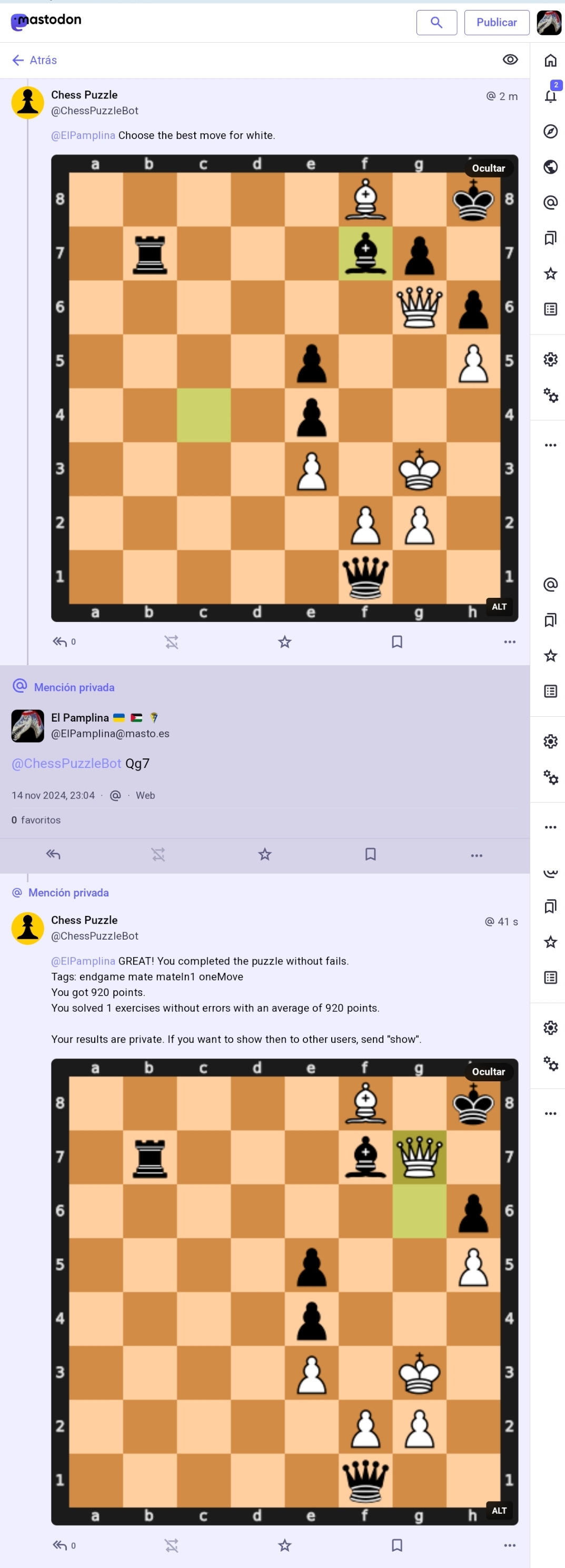
The bot is designed to be accesible to users with visual disability. All the board images are posted with ALT text using the standard FEN notation, that can be read and interpreted by most devices automatically.
You can find the original instance of this bot running in @ChessPuzzleBot@masto.es
Puzzles database
The bot works with the awesome puzzles database from Lichess. Lichess is the world's greatest open source non-profit chess server. They release their databases freely under the Creative Commons CC0 license. The puzzles database is available for download in this page as a huge CSV file.
Installation
You need Python 3.11 or greater with PIP and setuptools. The Python dependencies are listed in the `requirements.txt` file, all installable via PIP. The only system dependency is the Cairo graphics library (needed to convert the board images). In Debian and related systems (Ubuntu, etc.), install Cairo library with: `sudo apt install libcairo2 libcairo2-dev` In other Linux systems, use its convenient module system to get the Cairo library in a similar way. In Windows systems, I found that the Cairo library is bundled in the Python package, so usually you don't need to install it separately. Then, install the Python requirements (use system-wide PIP or, preferably, in a virtualenv: `pip install -r requirements.txt`
Database setup
An utility script is provided to generate the SQLite database used to index the puzzles and store user results. Get the `lichess_db_puzzle.csv.zst` file from the Lichess downloads page. Uncompress it with unzstd or other compatible tool. Then, generate the database with the command: `python3 dbsetup.py lichess_db_puzzle.csv db.sqlite 95` This command generates a `db.sqlite` file with all puzzles with popularity rate greater than 95. Currently, it's a huge table of 800000+ puzzles and 125 MB in size. If you want more puzzles, simply low down the popularity filter, but you could get a very huge file. The complete Lichess database holds currently more than 4 million puzzles! You have to be patient with the setup script. It will take a long time to store and index the SQLite database. After it, you don't need the CSV file anymore. It will also generate a tiny `tags.json` file with the distinct tags found in the puzzles. The tags are assigned by Lichess from known themes and strategies. The complete tags description can be found here.
Environment
Use the variables in the `.env` file to provide runtime parameters to the bot. You can also create a `.env.local` file to isolate some variables if you want to use some versioning system. The variables are: - API_BASE_URL: URL to your Mastodon server. **NOTE! Every server instance has its own rules regarding bots. PLEASE read the rules before running the bot over there. - APP_SECRET_FILE and USER_SECRET_FILE: Path to the files where the API will store the app and user authentication. The files will be generated in the first run, and then you will not need to enter the credentials anymore. - SQLITE_DB: Path to the SQLite file generated by the setup utility.
Starting up
Once you have installed the dependencies, and generated the database, the tags.json file and the environment variables, you can run the bot simply:
`python3 chesspuzzlebot.py`
The program will set up the authentication (first run), and start listening the events notified by the server about user interactions.
Since Mastodon 4.4, OAUTH password authentication is forbidden, so you have to copy the auth URL, log in a browser and copy the auth code. You only have to do this the first time, because the credentials will be stored in files. The old environment params MASTODON_USER_EMAIL and MASTODON_PASSWORD doesn't exist anymore.
The program is designed to run unattended without end. In case of connection is lost or any other errors, it will try to reconnect automatically.
There's an hourly routine that will post the "daily puzzle" and other challenges randomly to encourage followers to participate.
The bot will keep the command line open, sending all its logs to the standard output. You can follow the suitable procedure (to your operating system) to keep the bot running in background as a service or daemon. You can also change the logging settings in the chesspuzzlebot.py script to redirect logs to a file or any other destination, and to change the log level. Refer to the python logging documentation for all available settings.
Multilanguage support
The bot is created originally to talk either on Spanish or English. More languages can be added setting up more translation files on the "lang" directory. No more setup needed (texts in `texts.yml` are language-independent). VOLUNTEER TRANSLATORS WELCOME!
The bot will respond to commands in the same language in which they are written. Therefore, when creating new languages, it is important to always use different words for commands.
Using the bot
Any Mastodon user (from any federated instance) can reply to puzzles. The replies must be sent private (direct message) to respect other users and not to spoil the solutions. The bot will reject any non-private message.
You can reply to a puzzle with the next move that you consider the best. You can use PGN notation (such as Kh8) or UCI (such as h7h8). Use the correct capitalization, according to the rules of the notation.
It will reply to you if you got it right or wrong, and you can continue with the following moves.
If you do not know how to continue a puzzle, at any time you can ask me for the solution, by sending the answer "resolve". I will give you the next move, which will count as a fail, and you can continue the puzzle if you wish.
Users can: - Play the daily puzzle that is published every morning. - Ask privately for all the puzzles they want (sending the command "new"). - Ask for puzzles by theme. To do this, instead of "new", send one of the tags supported by Lichess (the ones in the tags.json file).
Apart from the moves or tags, the user can send these commands to the bot: - **new**: Get a new private puzzle. - **resolve**: Solve the next move. - **link**: Get link to continue puzzle in the Lichess website. - **results**: Get stats from your played puzzles. - **hide**: Tell the bot that you want to keep all your data private. The bot will not share any of your results with other users. It's the default option. - **show**: Tell the bot that you want to share your results with other users. - **help**: Get instructions about how to use the bot. - **hard**, medium, easy or all: Tell it that level of difficulty do you want for your private puzzles. Default is "all". - **tags**: Request a list of supported Lichess tags. - **delete**: Request to delete all your data stored in the database. The bot will forget all your activity, preferences and results.
Acknowledgements
This bot is made and maintained by @ElPamplina@masto.es as a side project for amusement only.
- Thanks to Lichess for all the puzzles. Thanks to Thibault Duplessis for creating and maintaining this awesome chess site. - Thanks to Lorenz Diener for creating the Mastodon.py API wrapper. - Thanks to Eugen Rochko and all the Mastodon team for creating the best open and free social network ruled by the people. - Thanks to Niklas Fiekas for maintaining the python-chess library. - And finally, thanks to the open source community for making the world better for all.