Contextual menu:
Hey,
Quick question:
Is there any way to access the right-click context menu without using the right mouse button?
Yeah, my touchpad's right button is broken and I can't find any other way to do it.
Thanks in advance!
Dec 09 · 6 days ago
6 Comments ↓
At least is MacOS is control left click, can be also set in linux with xbindkeys, but I do not know if it comes activaed by default.
mmm thanks! i can try it tomorrow
Back in ancient days CTRL+m was a somewhat standard way for activating a context menu for the currently focussed element. Now, I would try left-click in combination with the Windows key (or sometimes called the Super key), the CTRL key, the ALT key, or some combination of them. Some software also responds in useful ways to a triple-click of the left button.
In some programs SHIFT+F10 will display the context menu; you can also try the context menu key if you have that key on your computer (which some don't). (I don't know if either way works on Lagrange though)
on XFCE two fingers tap is right click... 🤔
On the Mac, Ctrl + Left click does work to open the context menu.
There is also a key you can bind to open the menu, though. The default is the forward slash key, but if your keyboard has a non-US layout, it may make sense to change that.
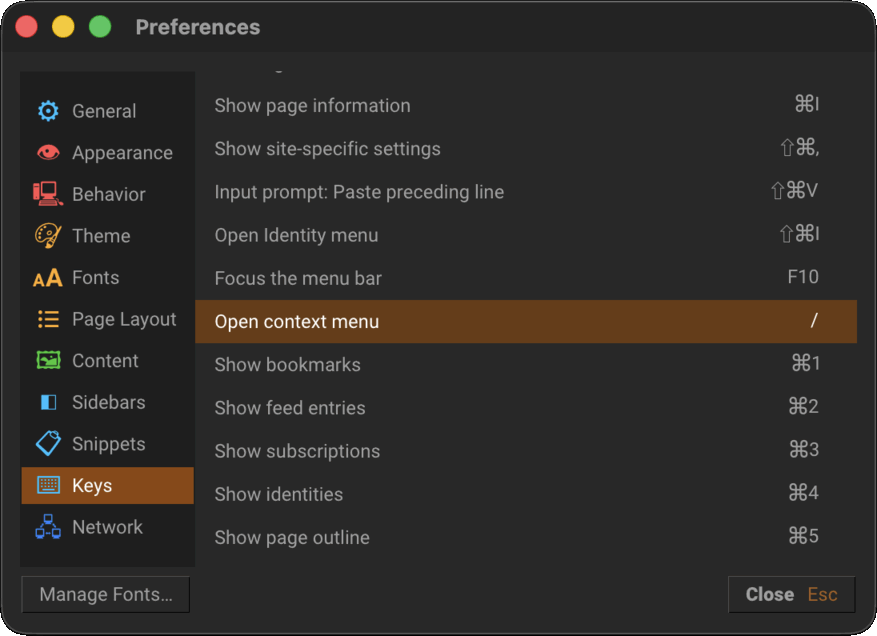
When testing that key now, looks like it doesn't work on link context menus, opening the page menu instead... I should remedy that in a future release.